Have you ever looked up at a bird soaring effortlessly through the sky and wished you could see the world from that perspective? With the rapid advancement of UAV (Unmanned Aerial Vehicle) technology, that dream is now a reality for millions. However, unboxing your first device can be intimidating. This tutorial drone guide is designed to take you from a complete novice to a confident pilot, ensuring you fly safely, legally, and skillfully.
Table of Contents
- Choosing the Right Tutorial Drone for Your Needs
- Understanding Your Equipment: Remote and Hardware
- The Essential Pre-Flight Checklist
- Your First Flight: A Step-by-Step Breakdown
- Mastering Basic Flight Maneuvers
- Advanced Techniques and Cinematic Moves
- Staying Safe: Laws and Regulations (FAA & Beyond)
- Maintenance and Troubleshooting
- Conclusion and Next Steps
Choosing the Right Tutorial Drone for Your Needs
Before you even touch the sticks, you need to ensure you have the right hardware. The market is flooded with options ranging from $30 toy drones to $3,000 professional cinema rigs. For a beginner, the best tutorial drone is one that offers a balance of stability, ease of use, and durability.
Statistics show that nearly 60% of first-time pilots crash within their first five flights. Therefore, looking for a model with obstacle avoidance sensors and a robust “Return to Home” (RTH) feature is a wise investment. Brands like DJI, Autel, and Potensic offer entry-level models that are specifically designed with learning modes that limit speed and altitude until the pilot gains experience.
Understanding Your Equipment: Remote and Hardware
Most modern drones use a “Mode 2” configuration on the remote controller. This is the global standard for most pilots. Understanding what each stick does is the first step in any tutorial drone curriculum.
- Left Stick (Throttle/Yaw): Pushing up/down controls the altitude (Throttle). Pushing left/right rotates the drone on its axis (Yaw).
- Right Stick (Pitch/Roll): Pushing up/down moves the drone forward and backward (Pitch). Pushing left/right moves the drone sideways (Roll).
- Gimbal Dial: Usually located on the shoulder of the remote, this controls the tilt of the camera.
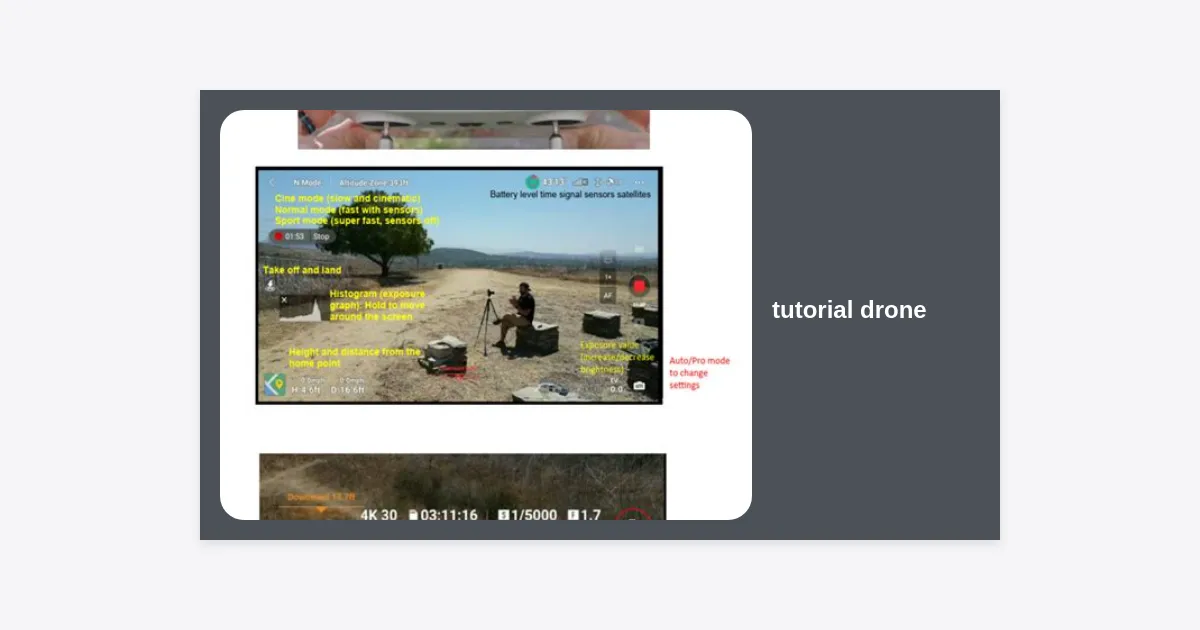
- Telemetry Screen: This provides vital data such as battery percentage, GPS signal strength, and distance from the home point.
The Essential Pre-Flight Checklist
Safe flying begins on the ground. Professional pilots never take off without a checklist, and neither should you. Use this list every time you prepare for a session with your tutorial drone.
- Check the Environment: Ensure you are in an open area away from people, power lines, and airports. Check the weather for high winds (above 15-20 mph is dangerous for beginners).
- Inspect the Hardware: Look for cracks in the frame and ensure the propellers are securely attached and not chipped.
- Battery Levels: Ensure the drone battery, remote controller, and your smartphone/tablet are fully charged.
- Calibrate the Compass: This prevents the drone from “drifting” or losing its orientation in flight.
- Check GPS Lock: Wait for at least 10-12 satellites before taking off to ensure an accurate Return to Home point is recorded.
Pro Tip: Always check the “B4UFLY” app or local regional maps to ensure you aren’t in restricted airspace. Flying in a No-Fly Zone can result in heavy fines.
Your First Flight: A Step-by-Step Breakdown
It is time for takeoff. Start in a wide-open field on a calm day. Place the tutorial drone on a flat surface, facing away from you. This ensures that “forward” on the stick matches “forward” from your perspective.
Slowly push the left stick up to take off. Most modern drones will hover automatically at about 4 feet. Spend a few minutes just watching the drone hover. This is the time to get a feel for how the wind affects its position. If the drone starts to drift, small corrections with the right stick will keep it centered.
Mastering Basic Flight Maneuvers
Once you are comfortable with hovering, it is time to develop muscle memory. Follow these exercises to improve your tutorial drone skills:
- The Square: Fly the drone in a large square pattern, keeping the nose (camera) facing away from you at all times.
- The Circle: Use the right stick to fly in a circle while keeping the drone’s height constant.
- Diamond Pattern: Fly forward-right, then backward-right, then backward-left, then forward-left. This teaches diagonal movement control.
Advanced Techniques and Cinematic Moves
After mastering the basics, you’ll want to capture those stunning cinematic shots seen on social media. Learning these maneuvers completes your tutorial drone journey from hobbyist to creator.
The “Orbit” Shot
This involves flying in a circle around a central object while keeping the camera focused on that object. It requires coordinating both sticks simultaneously—yawing in one direction while rolling in the opposite.
The “Dronie”
The classic drone selfie. Start with the drone close to you, then fly it backward and upward simultaneously. This reveals the scale of the landscape while keeping the pilot as the starting focus.
| Maneuver | Difficulty | Visual Effect |
|---|---|---|
| Bird’s Eye | Easy | Looking straight down; reveals patterns. |
| Tracking | Medium | Following a moving subject (car/runner). |
| The Crane | Medium | Moving vertically while tilting the camera. |
Staying Safe: Laws and Regulations (FAA & Beyond)
Safety is the most critical part of any tutorial drone guide. In the United States, the FAA requires most drones to be registered. Additionally, recreational flyers must pass the TRUST (The Recreational UAS Safety Test), which is free and available online.
Key rules to remember:
- Never fly above 400 feet.
- Maintain Visual Line of Sight (VLOS) at all times.
- Never fly over crowds or moving vehicles.
- Respect privacy; do not hover over people’s backyards without permission.
Maintenance and Troubleshooting
Your tutorial drone is a piece of high-precision machinery. To ensure it lasts for years, follow these maintenance tips:
Battery Care: Never store Lithium Polymer (LiPo) batteries fully charged or fully depleted. Aim for a 50-60% charge for long-term storage. Avoid flying in extreme cold, as this can cause the battery to fail mid-flight.
Firmware Updates: Manufacturers frequently release updates that improve flight stability and fix bugs. Check for updates before every outing to ensure your flight controller and remote are synced correctly.
Conclusion and Next Steps
Learning to fly isn’t just about moving sticks; it’s about preparation, safety, and creativity. This tutorial drone walkthrough has covered the essentials, from picking your first model to executing cinematic shots. The most important thing now is practice. Start slow, stay within legal boundaries, and gradually push your limits as your confidence grows.
Key Takeaways:
- Always perform a pre-flight inspection.
- Master the basic “Square” and “Circle” patterns before attempting high-speed flight.
- Stay updated on local drone regulations to avoid legal trouble.
- Invest in quality batteries and take care of them for flight longevity.
The sky is no longer the limit—it’s your playground. Happy flying!