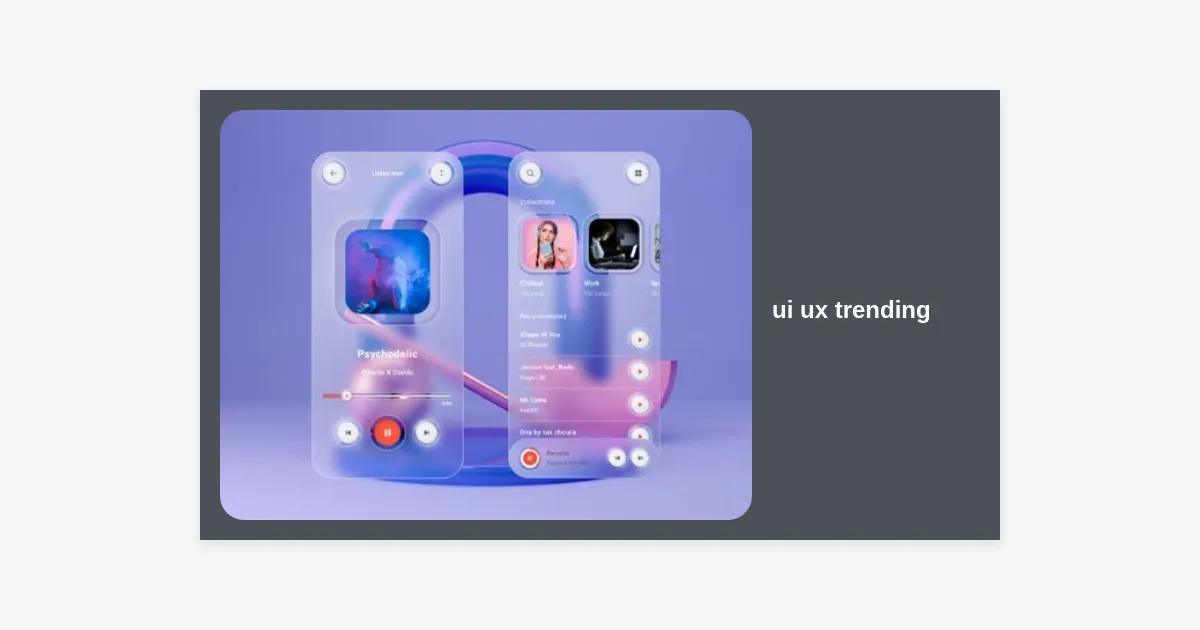
In an era where attention is the rarest currency, staying ahead of ui ux trending patterns isn’t just a strategy—it’s a survival mechanism for digital products. The landscape of User Interface (UI) and User Experience (UX) is shifting faster than ever, driven by breakthroughs in artificial intelligence, spatial computing, and a renewed focus on digital ethics. Whether you are a seasoned designer or a product owner, understanding the latest ui ux trending movements is essential for building interfaces that resonate with modern users who demand both speed and meaningful connection.
Table of Contents
- Generative AI and Predictive UX
- The Dominance of Bento Grids
- Spatial Computing: Designing Beyond the Screen
- Hyper-Personalization and Dynamic Content
- Micro-interactions: The Psychology of Feedback
- Accessibility-First and Inclusive Design
- Advanced Scrollytelling and Narrative Design
- Sustainable and Green UX Practices
- Dark Mode 2.0 and OLED Optimization
- Dynamic and Variable Typography
- Voice-First Interfaces and Conversational UI
- 3D Elements and Immersive Realism
- Minimalist Complexity and High Contrast
- The Fusion of Design and Low-Code Tools
- Ethical Design and Privacy-Centric UX
- Final Thoughts and Key Takeaways
Generative AI and Predictive UX
Artificial Intelligence is no longer just a backend process; it has moved to the forefront of ui ux trending topics. Generative AI is revolutionizing how we create and interact with interfaces. In 2024, we are seeing a shift from reactive UI to predictive UX. This means interfaces that anticipate user needs before they even click a button.
Predictive UX leverages machine learning to analyze user behavior patterns. For example, a banking app might surface the “Transfer Money” button precisely on the day you usually pay your rent. This reduces cognitive load and streamlines the user journey, making the digital experience feel intuitive and almost magical.
“AI isn’t replacing the designer; it’s replacing the mundane tasks, allowing designers to focus on complex emotional architecture.”
To implement this, designers must work closely with data scientists to understand trigger points. The goal is to create “anticipatory design” that feels helpful rather than intrusive. Transparency is key—users should always understand why a specific recommendation is being made.
The Dominance of Bento Grids
Inspired by the Japanese lunch box, the Bento Grid layout has become a massive ui ux trending staple. Popularized by Apple and later adopted by tech giants like Microsoft and Linear, this layout organizes information into neat, rectangular compartments of varying sizes. It offers an organized, visual hierarchy that works exceptionally well for dashboards and landing pages.
The beauty of the Bento Grid lies in its adaptability. It is inherently responsive, as boxes can easily stack and rearrange for different screen sizes. It also allows for high-information density without the aesthetic clutter of traditional grid systems.
- Visual Clarity: Each box acts as a content container, making scanning easy.
- Information Hierarchy: Larger boxes denote higher importance.
- Brand Consistency: It creates a modern, sleek look that emphasizes professionalism.
Spatial Computing: Designing Beyond the Screen
With the release of high-end headsets like the Apple Vision Pro and Meta Quest 3, spatial computing has solidified its place in the ui ux trending landscape. We are moving away from flat, 2D planes toward 3D environments where depth, lighting, and shadow play critical roles in navigation.
Designing for spatial UI requires a different mindset. Designers must consider physical space, hand tracking, and eye movement as primary inputs. Use of “Glassmorphism”—a semi-transparent, frosted-glass effect—is common here because it allows users to maintain a sense of their physical environment while interacting with digital overlays.
Practical advice for spatial design: maintain a distance of roughly 1-2 meters for primary interactive elements to prevent eye strain. Use directional audio cues to guide users toward notifications or important objects in their peripheral vision.
Hyper-Personalization and Dynamic Content
Generic user experiences are rapidly becoming obsolete. Hyper-personalization is a major ui ux trending movement where the interface adapts in real-time to the specific user. This goes beyond just greeting someone by their name; it involves changing the layout, color scheme, and content based on user preference, location, and history.
Statistics show that 80% of consumers are more likely to make a purchase when brands offer a personalized experience. In UX, this translates to dynamic homepages that prioritize features the specific user uses most. If a user frequently accesses the “Analytics” tab, a hyper-personalized UI will move that tab to a more prominent position automatically.
However, designers must balance personalization with privacy. Users need to feel in control of their data. Providing clear toggle switches for personalization features builds trust—a core component of modern E-E-A-T principles in design.
Micro-interactions: The Psychology of Feedback
Micro-interactions are the subtle animations and feedback loops that happen when a user performs a task. Think of the “heart” animation when you like a photo or the pull-to-refresh haptic feedback. These are critical in ui ux trending discussions because they provide a sense of tangibility to digital interfaces.
Well-designed micro-interactions serve three main purposes: failing gracefully (visual cues when something goes wrong), providing status updates (loading bars), and creating emotional delight. In 2024, we see a trend toward “micro-gestures”—highly specific movements that trigger complex actions, making the device feel more like an extension of the body.
Pro Tip: Keep micro-interactions under 400ms. Anything longer can feel sluggish and frustrate the user. The goal is to be noticed but not to interrupt the flow.
Accessibility-First and Inclusive Design
Accessibility is no longer a “nice-to-have” feature; it’s a legal and moral requirement. A significant ui ux trending focus today is WCAG 2.2 compliance. Designers are moving toward an “Accessibility-First” approach, where designs are built with screen readers, keyboard navigation, and color-blindness in mind from day one.
Inclusive design means considering the full range of human diversity. This includes designing for neurodiversity, such as creating “low-stimulation” modes for users with ADHD or sensory processing sensitivities. High-contrast modes and resizable text without layout breakage are standard expectations now.
- Color Contrast: Ensure a ratio of at least 4.5:1 for normal text.
- Aria Labels: Use descriptive labels for screen readers.
- Focus States: Never hide the focus ring; it’s essential for keyboard users.
Advanced Scrollytelling and Narrative Design
Scrollytelling is the art of telling a story through scrolling. As users scroll down a page, elements move, transform, and reveal themselves to create a linear narrative. This ui ux trending technique is highly effective for landing pages and product reveals because it keeps the user engaged and controls the pace of information delivery.
To master scrollytelling, use scroll-triggered animations (like GSAP or Framer Motion). Ensure that the scroll speed feels natural and does not “hijack” the user’s control. “Scrolljacking”—where the website changes how the scroll wheel works—should be used sparingly as it can lead to a frustrating experience if not implemented perfectly.
Sustainable and Green UX Practices
As the tech industry’s carbon footprint comes under scrutiny, “Sustainable UX” has emerged as a vital ui ux trending niche. This involves designing digital products that require less energy to run. Strategies include optimizing image sizes to reduce data transfer, using dark modes to save battery on OLED screens, and writing efficient code.
Green UX also focuses on “efficient paths.” By helping a user complete a task in 3 clicks instead of 6, you are literally reducing the energy consumed by servers and devices. It’s an intersection of optimization, ecology, and excellent user experience.
Dark Mode 2.0 and OLED Optimization
Dark mode has evolved from a simple color swap to a sophisticated system design. Dark Mode 2.0 involves using “true blacks” for OLED screens to save battery life, combined with layered shadows to create depth. It is one of the most requested features in ui ux trending reports.
Modern dark modes avoid pure white text on pure black backgrounds to prevent “halation” (a ghosting effect for some eyes). Instead, designers use off-whites and dark grays. This improves readability and reduces eye strain in low-light environments.
Dynamic and Variable Typography
Typography is no longer static. Variable fonts allow designers to use a single font file that can be adjusted for weight, width, and slant dynamically. This is a top ui ux trending topic because it significantly reduces page load times (fewer font files) while offering immense creative freedom.
Responsive typography ensures that text size and line height adjust perfectly based on the viewport size. This maintains readability across devices, from a smartwatch to a 32-inch monitor. Use fluid type scales to automate this process in your design system.
Voice-First Interfaces and Conversational UI
With the integration of LLMs (Large Language Models) into virtual assistants, voice-first interfaces are becoming more natural and capable. This ui ux trending shift involves designing for “invisible interfaces.” UX designers are now focusing on the “Voice Experience” (VX)—designing scripts, tone of voice, and error handling for spoken interactions.
The challenge here is the lack of visual cues. Designers must rely on clear verbal feedback and confirm actions to ensure the user feels in control. Voice UI is particularly powerful for accessibility and for hands-free environments like kitchens or cars.
3D Elements and Immersive Realism
As web technologies like WebGL and WebGPU mature, we see an increase in 3D elements integrated directly into the browser. This ui ux trending direction adds a layer of depth and realism that 2D graphics cannot match. Interactive 3D product previews allow users to rotate and inspect items, significantly increasing conversion rates in e-commerce.
However, 3D should be used with caution. High-resolution 3D models can slow down site performance. Always provide 2D fallbacks and ensure the 3D elements serve a purpose rather than being mere “eye candy.”
Minimalist Complexity and High Contrast
There is a move toward what experts call “Minimalist Complexity.” This involves a clean, minimalist aesthetic that hides deep complexity. It’s about keeping the interface simple but making powerful features easily discoverable. This is a key ui ux trending philosophy for SaaS products.
High-contrast designs are also making a comeback. Bold, clashing colors and large borders (Neo-brutalism) help elements stand out and create a strong brand identity in a sea of similar-looking “clean” corporate designs.
The Fusion of Design and Low-Code Tools
The gap between design and development is closing. Tools like Framer and Webflow allow designers to build real, high-performance websites without writing a line of code. This ui ux trending shift means designers now have more control over the final product than ever before.
Understanding the constraints of the web (CSS, HTML) is now a core skill for UX designers. This “design-as-development” approach results in faster iteration cycles and a final product that looks exactly like the prototype.
Ethical Design and Privacy-Centric UX
Finally, ethical design is a growing ui ux trending concern among users. “Dark patterns”—design tricks used to manipulate users into doing things they didn’t intend to—are being called out and even regulated. Ethical UX focuses on transparency, ease of unsubscribing, and clear data usage policies.
Trustworthiness is a pillar of E-E-A-T. By designing with honesty, you build long-term brand loyalty that far outweighs the short-term gains of deceptive tactics.
Practical Checklist for Implementing UI UX Trends:
- Audit your accessibility: Use tools like Stark or Wave to check for compliance.
- Optimize for performance: Ensure your 3D or motion elements don’t kill the page load speed.
- Iterate based on data: Use A/B testing to see if a trend (like Bento Grids) actually works for your specific audience.
- Stay human-centric: Don’t use AI just for the sake of it; use it to solve a real pain point.
Ready to Master the Future of Design?
Download our comprehensive 2024 UI/UX Trend Report PDF to get even deeper insights, case studies, and design templates.
Conclusion
The world of ui ux trending design is a balance between aesthetic innovation and functional utility. As we move through 2024, the most successful products will be those that embrace AI and spatial computing while remaining grounded in human-centric principles like accessibility and ethical design. By staying informed of these shifts, you can create digital experiences that are not only beautiful but also inclusive, efficient, and future-proof. Remember, the best design is often the one that disappears, making the user’s task feel effortless and natural.
Key Takeaways:
- AI is shifting from a back-end tool to a front-end predictive UX assistant.
- Bento Grids and Spatial Computing are redefining how we organize and interact with information.
- Sustainability and Ethics are now critical components of a successful design strategy.
- Accessibility is non-negotiable and provides a better experience for everyone.